Hadeya Font Review
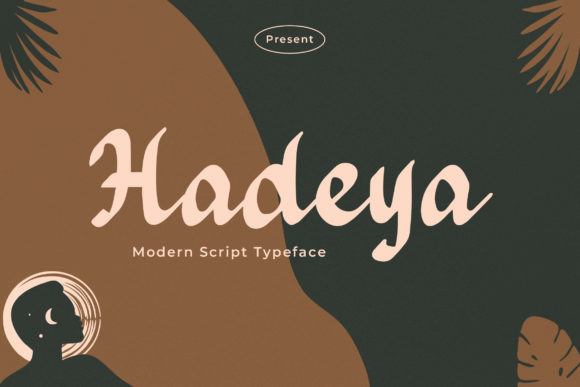
As a web designer, I’m always on the lookout for fonts that add personality without sacrificing usability. Hadeya has quickly become one of my go-to choices for adding a touch of warmth and elegance to digital projects. It’s a modern paint-brushed handwritten font that feels both authentic and refined, making it perfect for creative websites, brand identities, and online marketing materials.
First Impressions on a Website Layout
I first tested Hadeya in a hero section of a boutique online store. The font’s soft, flowing strokes gave the headline a handcrafted feel that stood out against a clean background. It felt like a warm welcome rather than a loud statement, which was exactly what the brand needed. The font’s natural variation made each letter feel unique, giving the design a personal touch that mass-produced fonts often lack.
On mobile devices, Hadeya held up well. The spacing was generous enough to prevent crowding, and the stroke weight was just right for readability without looking too bold. I used it for a call-to-action button as well, and it worked surprisingly well—especially when paired with a simple sans serif for the supporting text.
Using Hadeya in Web Design Projects
One of the biggest challenges with decorative fonts is ensuring they don’t compromise readability, especially on smaller screens. Hadeya passes this test with flying colors. I’ve used it in several project landing pages, where it served as a strong visual anchor for headlines and subheadings. Its subtle swashes and flourishes added character without overwhelming the layout.
For a coaching website, I paired Hadeya with a clean, modern sans serif for body copy. The contrast was striking. The script font drew attention to key messages, while the sans serif kept the rest of the content easy to scan. This combination created a balanced look that felt both professional and approachable.
In a portfolio site, Hadeya worked great for project titles. It added a personal flair that matched the creator’s style, while still maintaining a level of sophistication. The font’s versatility allowed it to work in different contexts—from a bold header to a subtle tagline.
Best Practices for Web Use
Hadeya shines when used for short phrases, headings, and decorative accents. It’s not ideal for long paragraphs or dense blocks of text, as the intricate details can make it harder to read at smaller sizes. For body copy, I recommend pairing it with a more structured typeface like a sans serif or serif font.
When using Hadeya on dark backgrounds or image overlays, the font’s lighter strokes helped it stand out without clashing. On light backgrounds, it maintained good contrast and legibility. I also found that using it for buttons and CTA elements added a nice visual boost without being distracting.
For accessibility, it’s important to ensure sufficient line height and spacing. Hadeya’s fluidity makes it less suited for small navigation menus or form labels, where clarity is critical. But for headers, banners, and promotional sections, it’s a solid choice.
Font Pairing and Brand Consistency
Pairing Hadeya with other fonts is key to maintaining a cohesive design system. In one project, I combined it with a classic serif font for a more editorial feel. The result was elegant and timeless, perfect for a blog or magazine-style site. In another case, I used it alongside a minimalist sans serif to create a modern, clean aesthetic.
When working on a brand identity, Hadeya helped establish a friendly yet professional tone. It was especially effective in logo designs, where its handmade quality gave the brand a more personal and authentic feel. The font’s versatility made it easy to adapt across different touchpoints, from website headers to social media graphics.
Considerations Before Using Hadeya
Before integrating Hadeya into a project, it’s worth checking the available styles, weights, and file formats. Some versions may include alternates, ligatures, or swashes that can enhance the design. Also, if you’re using it for commercial purposes, make sure the licensing allows for web use and digital distribution.
If you’re designing for a wide range of languages or special characters, verify that Hadeya supports those features. While the font excels in English, multilingual support can vary depending on the version you choose.
Overall, Hadeya is a powerful tool for web designers looking to add a human touch to their digital work. Whether you're building a portfolio, launching an online store, or redesigning a website, this font brings a sense of creativity and authenticity that can elevate your design significantly.